I'll be referring to this Tunnel as VPN-RA-Test. Give it whatever name you need!
### 1. Creating a VPN Tunnel 1. Go to VPN - IPsec Tunnels 2. Click Create New and select IPsec Tunnel - Template Type: Custom - Name: VPN-RA #### 1.1. Network Settings - 1. Set *IP Version* to **IPv4** 2. Set *Remote Gateway* to **Dialup User** - Interface: Your WAN Interface 3. Disable *Local Gateway* 4. Enable *Mode Config* 5. Set *Client Address Range* manually or Assign Range Address Object 6. Set *Subnet Mask* `255.255.255.255` to prevent Inter-Device Communication inside the Tunnel or specify explicitly 7. Set your preferred DNS Server. 8. Enable *Enable IPv4 Split Tunnel* - Select your Address Object representing the Networks that should be accessable 9. Disable *IPv6 Mode Config* - *Client Address Range* 10. Set *NAT Traversal* to **Enable** 11. Set *Dead Peer Detection* to **On Idle** [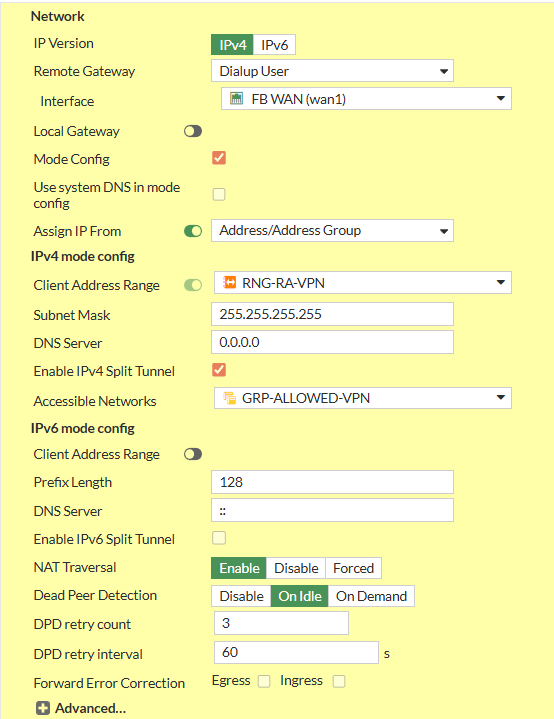](https://kb.oliver-karger.de/uploads/images/gallery/2025-09/MfSimage.png) #### 1.2. Authentication 1. Set *Method* to **Pre-shared Key** 2. Write your PSK to the *Pre-shared Key* Input Field 3. Set *IKE* - *Version* to **1** 4. Set IKE - *Mode* to **Agressive** 5. Set *Peer Options* - *Accept Types* to **Any Peer ID** [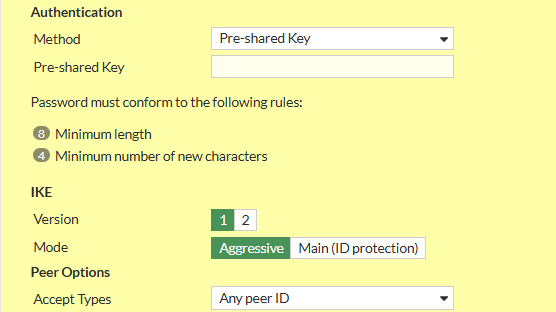](https://kb.oliver-karger.de/uploads/images/gallery/2025-09/v2Bimage.png)You can set a Peer ID here to differentiate different Tunnels that might share Settings and/or PSKs
#### 1.3. Phase 1 ProposalRemove all existing Phase 1 Proposals beforehand by clicking the **X** Button the right side
1. Add the following Proposals - Encryption: **AES256**, Authentication: **SHA256** - Encryption: **AES256**, Authentication: **SHA1** 2. Check *Diffie-Hellmann Groups* **14**, **19**, **20** 3. Set *Key Lifetime (seconds)* to **28800** [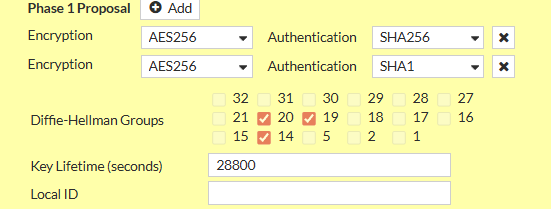](https://kb.oliver-karger.de/uploads/images/gallery/2025-09/PIVimage.png) #### 1.4. XAuth 1. Set *Type* to **Auto Server** 2. Set *User Group* to **Inherit from policy** [](https://kb.oliver-karger.de/uploads/images/gallery/2025-09/h03image.png) #### 1.5. Phase 2 SelectorsThere should only be one Phase 2 Selector pre-existing with the Name of the Tunnel you specified
##### 1.5.1 Edit Default Phase 2 Selector 1. Click on the Pen Icon at the Right Side of the Row to Edit 2. Expand the Advanced Menu by clicking on *Advanced* 1. Set *Name* to **VPN-RA-P2** 2. Set *Local Address* to Type **Subnet** and Value `0.0.0.0/0` 3. Set *Remote Address* to Type **Subnet** and Value `0.0.0.0/0` 4. Delete all existing Phase 2 Proposals 5. Add the following Phase 2 Proposals (same as with Phase 1) - Encryption: **AES256**, Authentication: **SHA256** - Encryption: **AES256**, Authentication: **SHA1** 6. Enable *Enable Replay Detection* 7. Enable *Enable Perfect Forward Secrecy (PFS)* 8. Check *Diffie-Hellmann Groups* **14**, **19**, **20** 9. Enable *Local Port* 10. Enable *Remote Port* 11. Enable *Protocol* 12. Set *Key Lifetime* to **Seconds** and set `3600` [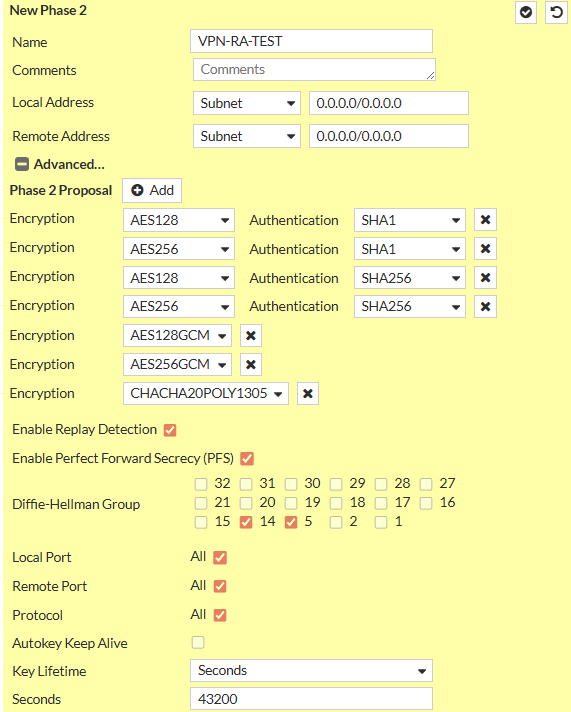](https://kb.oliver-karger.de/uploads/images/gallery/2025-09/yHximage.png) ### 2. Create Policies For a Policy-based IPsec VPN you need Policies that allow both the Address Range of the Clients and the Users to access the Networks you need. Depending on the Networks you specified, you need Policies from WAN->LAN and maybe WAN->OtherLAN. #### 2.1 Example Policy This is an Example Policy from WAN to LAN I use Address Objects here that i also specified in the Tunnel Configuration.Note: You cannot specifiy Subnet Address Objects in the Tunnel Configuration, only IP Ranges. But if the Subnet contains the IP Range, this works fine. Example: Range is 192.168.10.100 - 192.168.10.200 so a Subnet of 192.168.10.0/24 would work just fine
[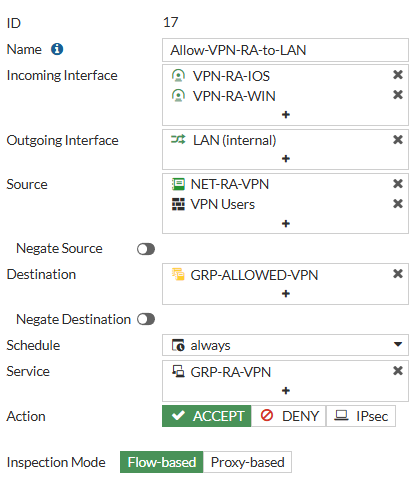](https://kb.oliver-karger.de/uploads/images/gallery/2025-09/kF5image.png) Here my Policies allows Traffic from the VPN Tunnel Interfaces (created when creating the Tunnel) to the LAN Interface. As here, Authentication is Policy-based, for the Source we also need the User/User Groups. Destination is a Group i created that is the same i used for the *Split Tunneling* - *Accessable Networks* You can also specify a Schedule or Service if you want to.You need Policies in both Directions for them to work correctly!